Block the feed, keep the app4 min read
How to Block YouTube Shorts on Android and Keep the Rest of YouTube
YouTube only lets you hide the Shorts shelf for 30 days at a time, and the Shorts tab always comes back. To block YouTube Shorts on Android for good you need something outside the app: an accessibility based blocker that closes the Shorts player, or scroll friction that makes the Shorts feed physically resist swiping. Both keep the rest of YouTube intact.
On this page (5 sections)
YouTube is two products in one app. There is the one you chose: subscriptions, long videos, playlists, things you searched for. And there is the one that chose you, which is Shorts.
To block YouTube Shorts on Android without losing the half of YouTube you actually like, you need help from outside the app. It takes a couple of minutes and costs nothing.
What changes once it is set up:
- Stays: subscriptions, search, playlists, comments, and normal video playback, including background play if you have Premium.
- Goes: the Shorts player and the endless swipe from one short to the next.
- Optional: friction on every swipe, or a scroll limit that ends a session after a set number of shorts.
Block YouTube Shorts on Android in four steps
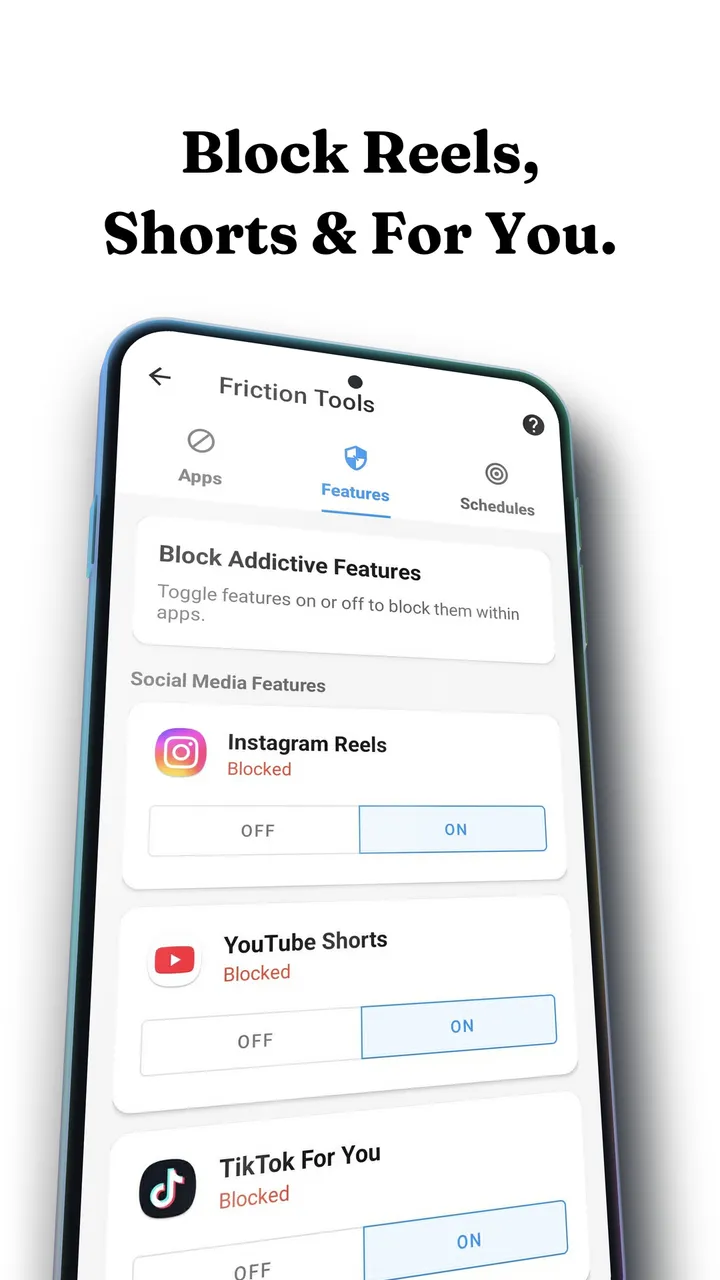
Android's accessibility service lets an app recognise which screen you are on, which is how a blocker can tell the Shorts player apart from a normal video. Fluid Friction calls this Feature Blocking, and it works the same way for Instagram Reels and the TikTok For You page.
Install Fluid Friction and grant accessibility access
Download it free from Google Play, then grant the accessibility permission. Android shows a warning screen because this permission is powerful. It is also the only way any app can distinguish Shorts from the video you meant to watch.
Open Tools, then Feature Blocking, then YouTube
Shorts is its own switch. Turning it on leaves subscriptions, search, playlists and normal video playback completely untouched.
Decide: block Shorts, or slow it down
With the switch on, Fluid Friction closes the Shorts player the moment it opens. If you would rather keep Shorts but make it hard to scroll, leave the switch off and turn on scroll friction for YouTube instead.
Optional: set a session scroll limit
If you would rather ration Shorts than remove them, a scroll limit ends the session after a set number of swipes instead of blocking the surface outright.
Block it or slow it down? If you have uninstalled blockers before, start with friction, because there is nothing to resent and so nothing to switch off in a weak moment. If Shorts only gets you late at night, use a schedule that stays gentle by day and turns intense after 10pm.
Why a block alone usually fails, and what friction adds
Shorts works for the same reason every short form feed works: the next video costs one flick of a thumb. Nothing about that swipe asks you whether you meant it. A hard block answers that with a wall, and walls get switched off on the evening you want them gone.
Scroll friction changes the swipe instead. Each scroll becomes a drag through on screen fluid, and past a threshold you set, a bubble has to form and rise off the screen before the feed moves at all. Flick fast and the bubble just bursts, which does not count as a scroll.
You can still watch Shorts, but you cannot watch them absent mindedly. That is the whole design, and it is why friction survives the moment a hard block gets uninstalled. The mechanics are in how scroll friction works.
Friction also reaches places a tab block cannot. Shorts show up in search results, in your subscriptions feed and as a shelf under the video you are watching, and every one of them opens into the same swipeable player. With friction on, each of those players moves one short per deliberate drag, so a single short you meant to watch stays a single short.
What YouTube's own settings can and cannot do
Hiding the Shorts shelf from the three dots menu lasts 30 days, then the shelf returns. Turning off watch history starves recommendations across the whole app and makes your normal suggestions worse. Premium removes ads and does nothing about Shorts. Marking shorts as Not interested and unsubscribing from channels that post mostly Shorts helps a little, but recommendations drift back within weeks.
The one free option with no app is youtube.com in Chrome with "Desktop site" ticked, which puts Shorts in a sidebar row instead of a full screen swipeable player. It costs you background play, downloads and a decent player, so it suits people who mostly watch on a laptop.
Shorts blockers on Android, compared on price
- Fluid FrictionThis guideFreeEvery blocking tool included. Optional subscription is cosmetic only.Keeps the rest of the appFriction on every swipe
- ScreenZenFreePaid extras $4.99 to $19.99Keeps the rest of the appPause before opening
- one secFree for one appPro $3.99 to $99.99Keeps the rest of the appBreath before opening
- OpalCore needs a plan$2.99 to $79.99, account requiredWhole app onlyBounces you out to Opal
- AppBlockFree for 3 appsPremium $0.99 to $119.99Keeps the rest of the appBlocks feeds on a schedule
- BrickAbout $59For the NFC device the app needsWhole app onlyTap a device to unlock
ScreenZen, one sec and AppBlock can also block Shorts on their own, and all three are good. They pause you before YouTube opens or block the feed on a schedule; Fluid Friction also works on the swipe itself, and every blocking tool in it is free with no account. Opal and Brick block YouTube as a whole, so your subscriptions go with it. More in the roundup of free app blockers on Android.
Common questions
How do I hide YouTube Shorts on my phone?
On Android, turn on YouTube Shorts in Fluid Friction's Feature Blocking, which closes the Shorts player while the rest of YouTube keeps working. YouTube's own "hide" option on the Shorts shelf only lasts 30 days and leaves the Shorts tab in place.
Can I turn the blocker off if I need it?
Yes. Anything built on Android's accessibility service can be switched off in Android settings, and no app can or should override that. Friction is also never a wall: you can always push through it, it just stops being automatic.
Can you permanently remove the Shorts tab in YouTube?
Not from inside YouTube. Hiding the Shorts shelf lasts 30 days and does not affect the tab or the Shorts player. Removing Shorts for good on Android requires a third party blocker, or using YouTube in a browser with the desktop layout.
Does blocking Shorts break the rest of YouTube?
No. Feature Blocking targets the Shorts surface only, so subscriptions, search, playlists, comments and normal video playback keep working exactly as before.
Is there a free way to block YouTube Shorts on Android?
Yes. Fluid Friction's Feature Blocking, scroll friction, scheduling and limits are all free. The optional Fluid Pro subscription only unlocks cosmetic extras such as extra themes and dark mode.
Will this also work on the YouTube website?
The accessibility based approach targets the YouTube app. If you browse YouTube in Chrome, the desktop layout is the simpler route, since it does not present Shorts as a full screen swipeable feed.
Does this work on iPhone?
Yes, with a different method, because iOS forbids one app from changing another. On iPhone, Fluid Friction hides Shorts inside its own browser for YouTube. See how to block YouTube Shorts on iPhone.