Block the feed, keep the app4 min read
How to Block the TikTok For You Page and Keep the App
TikTok has no setting that removes the For You page, and its screen time limits are a passcode you already know. To block the TikTok For You page on Android you need an app that recognises the For You surface and either closes it or makes it resist scrolling. Both leave Following, search and DMs working normally.
On this page (5 sections)
The For You page is the most refined recommendation feed ever built. That is not a compliment or an insult, it is just the reason ordinary self control does not hold up against it, and the reason people look for a way to block the TikTok For You page while keeping the parts of TikTok they chose.
TikTok will not help you here, so the fix comes from outside the app. On Android it takes a couple of minutes and costs nothing.
What changes once it is set up:
- Stays: Following, search, DMs, your profile and your own uploads.
- Goes: the For You feed and the endless swipe from one video to the next.
- Optional: friction on every swipe, or a session limit that ends the feed after a set number of videos.
Block the TikTok For You page on Android in four steps
Android's accessibility service can tell an app which screen is on display, which makes it possible to treat For You as its own surface, separate from Following, search, your inbox or your profile.
Install Fluid Friction and grant accessibility access
Get it free on Google Play. Android shows a warning before granting accessibility because the permission is powerful. It is also the only mechanism that can distinguish For You from a DM.
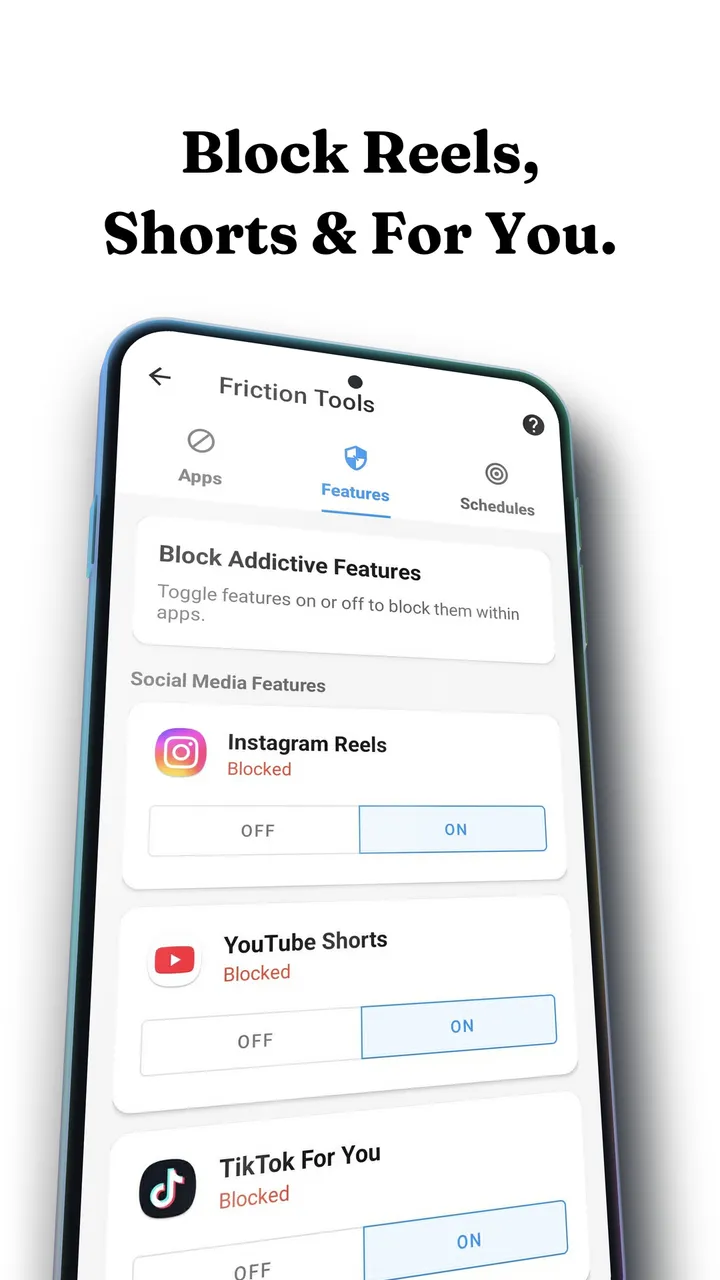
Open Tools, then Feature Blocking, then TikTok
For You is its own switch. Turning it on leaves Following, search, DMs and your own uploads untouched.
Decide: block For You, or slow it down
With the switch on, Fluid Friction sends you straight back out of For You the moment it opens. If you would rather keep For You but make it hard to scroll, leave the switch off and turn on scroll friction for TikTok instead.
Optional: cap the session instead of blocking it
A session scroll limit ends the feed after a set number of swipes. This suits people who want TikTok rationed rather than removed.
Block it or slow it down? If you have already typed past TikTok's own passcode a few times, start with friction rather than a block: a wall gets switched off on a bad night, while friction leaves nothing to resent, so it tends to stay on. If you post on TikTok for work, blocking For You keeps your uploads and inbox untouched while the recommendation feed stays shut.
Why a block alone usually fails, and what friction adds
For You works because the next video costs one flick. The recommendation model is extraordinary, but it only gets to perform because the interface never asks you a question. A hard block answers with a wall, and walls get switched off on the evening you want them gone, which is the pattern in why app blockers stop working.
Scroll friction asks the question physically instead. Each swipe becomes a drag through on screen fluid. Past a threshold you choose, a bubble forms under your thumb and has to rise off the screen before the feed moves. Flick fast and you only burst the bubble, which does not advance anything.
Absent minded scrolling simply stops working, because absent minded input cannot clear the threshold. And you are never locked out, so there is no moment where the app becomes the enemy and gets uninstalled. How scroll friction works explains the physics.
Friction can also run on a schedule. For You at lunch is rarely the problem; For You at 1am is. A time based preset stays gentle through the day and turns intense after 10pm, so the resistance matches the hours you are actually vulnerable. The reasons that window is different are in why you scroll at night.
What TikTok's own controls can and cannot do
TikTok's Daily screen time limit asks for a four digit passcode you chose yourself, so after a week most people type it without reading the screen. Restricted Mode filters mature content and has nothing to do with how much you scroll. Marking videos Not interested, clearing your watch history under Activity centre and opening Following first all retrain the model slowly, which is worth doing, but none of it works in the moment. TikTok also always reopens on For You.
Which method fits you
Pick by what you still want TikTok for, not by which option sounds strictest.
| Your situation | Best method | Why |
|---|---|---|
| You post or message on TikTok | Feature Blocking on For You | Leaves everything except the recommendation feed |
| You have already bypassed TikTok's own limit | Friction | Nothing to bypass, the resistance is in the swipe |
| It is only a night time problem | Scheduled friction | Gentle by day, intense in the hours that actually hurt |
| You want TikTok gone entirely | App level daily limit | Blunt, but honest about what you want |
Common questions
How do I block a page or account on TikTok?
Open the account's profile, tap the share arrow or the three dots in the top corner, and choose Block. That stops one account from reaching you. It does not change the For You feed itself, which is what Feature Blocking is for.
Can I turn the blocker off if I need it?
Yes. Anything built on Android's accessibility service can be switched off in Android settings, and no app can or should override that. Friction is also never a wall: you can always push through it, it just stops being automatic.
Can you turn off the For You page in TikTok?
No. TikTok has no setting that removes or disables the For You feed, and the app always reopens on it. Blocking it on Android requires a third party app that can recognise the For You surface.
Does TikTok's screen time limit actually work?
It prompts you for a passcode that you set yourself, so it works only for as long as you choose to respect it. Most people learn the code and stop noticing the prompt within a week or two.
Will blocking For You break DMs or Following?
No. Feature Blocking treats For You as a separate surface, so Following, search, direct messages, your profile and uploading all keep working normally.
Is there a free way to block the TikTok feed on Android?
Yes. Fluid Friction's Feature Blocking, scroll friction, session limits and scheduling are free. The optional Fluid Pro subscription only adds cosmetic extras such as the full theme catalogue and dark mode.
Does this work on iPhone?
Yes, with a different method, because iOS forbids one app from changing another. On iPhone, Fluid Friction loads TikTok in its own browser, where For You can be switched off. See how to block the TikTok For You page on iPhone.