Block the feed, keep the app4 min read
How to Block Snapchat Spotlight on iPhone and Android
Snapchat gives you no way to remove Spotlight or Discover, because both are advertising surfaces rather than features. To block Snapchat Spotlight you need something outside Snapchat: on Android a blocker that closes the Spotlight screen when it opens, and on iPhone a browser that loads Snapchat with those surfaces hidden. Chats, snaps and streaks are unaffected either way.
On this page (5 sections)
Almost nobody installs Snapchat for Spotlight. People install it for the friends they talk to, the streaks they are weirdly attached to, and the camera. Spotlight is the vertical video feed that arrived later, and Discover is the publisher and advertiser wall next to it.
Both are two taps from the camera, and neither has an off switch, because they are where Snapchat makes its money. To block Snapchat Spotlight without losing the parts you joined for, the answer sits outside Snapchat, and it takes a couple of minutes on either phone.
What changes once it is set up:
- Stays: chats, snaps, the camera, Stories from friends, and your streaks. Streaks live in chat, so blocking the feeds never touches them.
- Goes: the Spotlight video feed, and on iPhone the Discover wall as well.
- Optional: a schedule, so Spotlight is blocked after 10pm and open at lunch.
Block Snapchat Spotlight on Android
An accessibility service can tell which screen is in front of you, which is how a blocker distinguishes the Spotlight feed from the chat list and acts on one without touching the other.
Install Fluid Friction and grant accessibility access
Download it free from Google Play. Android will show a warning screen when you grant accessibility access, because the permission is powerful. It is also the only mechanism on Android that can tell Spotlight apart from a conversation.
Open Tools, then Feature Blocking, then Snapchat
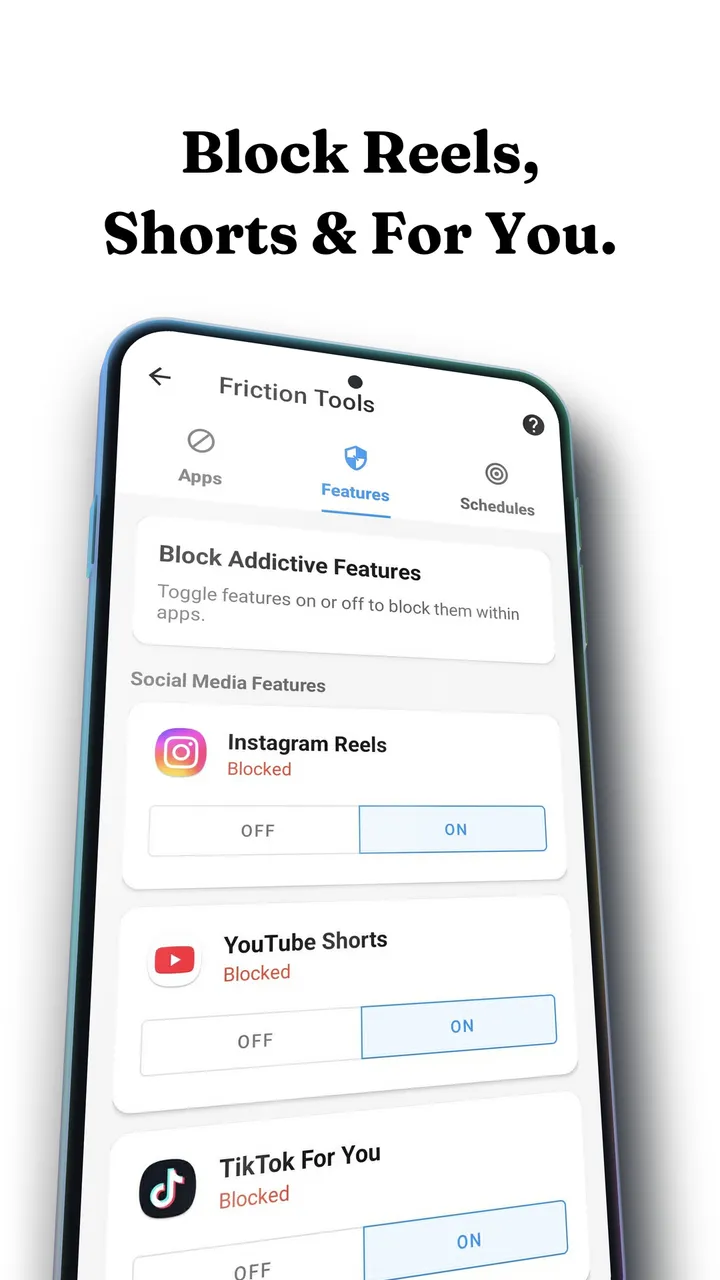
Spotlight is its own switch, alongside the equivalents for Instagram Reels and the TikTok For You page. Turning it on leaves the camera, chats, streaks and Stories untouched.
Decide: block Spotlight, or slow it down
With the switch on, Fluid Friction closes Spotlight as soon as it opens, which is what most people want here, since Spotlight is rarely the reason anyone opens Snapchat in the first place. If you use Spotlight occasionally on purpose, leave the switch off and turn on scroll friction for Snapchat instead.
Add a schedule if the problem is time based
Spotlight blocked after 10pm and open at lunch is a more realistic setting than a flat rule, and schedules are the setting people keep longest.
Block Snapchat Spotlight on iPhone
Apple's sandbox prevents one app from seeing or changing another, and Screen Time works on whole apps rather than screens inside them. Screen Time can shield Snapchat entirely; it cannot remove Spotlight. So on iPhone you use Snapchat's web version inside an app that is allowed to restyle it.
Install Fluid Friction from the App Store
Get it on the App Store. There is no Fluid Friction account, and the functional tools are free.
Open Snapchat inside the friction browser and sign in
Snapchat's own login page loads in the in-app browser, exactly as it would in Safari. Your credentials go to Snapchat, and the session stays on your device.
Turn on Block Spotlight and Block Discover
Spotlight is the video feed and Discover is the publisher wall. They pull in different ways, and most people who block one end up blocking both within a day.
Use Screen Time on the native app so the browser is the easy path
An app limit on Snapchat's real app means the unrestricted version is not the one your thumb reaches for at 11pm.
The web version of Snapchat is weaker than the app, and the camera is the part that suffers, since filters and lenses lean on the native app. Plenty of people keep the native app for sending snaps and use the friction browser for everything else, so the feeds stay off the path their thumb uses most.
When friction beats blocking here
Blocking Spotlight works well because Spotlight is genuinely optional for most people. Friction is the better answer when the surface is one you sometimes choose. Each scroll becomes a drag through on screen fluid, and past a threshold you set, a bubble has to form under your thumb and rise off the screen before the feed moves. A fast flick bursts the bubble, and a burst advances nothing.
The result is a feed you can still use deliberately but cannot use absent mindedly. The mechanics are in how scroll friction works, and why hard blocks tend to get switched off is in why app blockers don't work.
Which option fits
| What you want | What to use |
|---|---|
| Spotlight gone, friends kept | Feature blocking on Android, or the friction browser on iPhone |
| Discover gone as well | Both switches, they are separate surfaces |
| Snapchat only in the evening | A schedule on the feeds, not on the app |
| Less Snapchat overall | Screen Time or a full app limit, accepting the streak cost |
| To still watch Spotlight sometimes | Friction rather than blocking |
Common questions
How do I restrict Snapchat on iPhone?
Screen Time can limit or block the whole Snapchat app, which also stops your snaps and streaks. To restrict only Spotlight and Discover, open Snapchat inside Fluid Friction's browser and switch those two surfaces off, then put a Screen Time limit on the native app.
Can you turn off Spotlight in Snapchat settings?
No. Snapchat has no setting that disables Spotlight or Discover, because both are advertising surfaces. You can hide individual Discover channels and mark Spotlight videos as not interesting, but the tabs and the feeds remain.
Does blocking Spotlight affect my streaks?
No. Streaks live in chat, and blocking Spotlight or Discover does not change your ability to send or receive snaps. A full app limit would affect streaks, which is a reason to block the feeds rather than the whole app.
Why is this harder on iPhone than Android?
Android lets an app hold an accessibility service and recognise which screen is open, so it can close Spotlight specifically. iOS forbids one app from reading or modifying another, so the only route is loading Snapchat's web version somewhere that can restyle it.
Is Snapchat on the web good enough to use daily?
For chats and viewing it is usable. The camera is the weak point, so many people keep the native app for sending snaps and use the friction browser for everything else, which keeps the feeds off the path they use most often.
Does this need an account with Fluid Friction?
No. Fluid Friction has no account and no sign in of its own on either platform. When you use the in-app browser you sign in to Snapchat on Snapchat's own page, and that session stays on your device.
Is it free to block Snapchat Spotlight?
Yes, on both iPhone and Android. Fluid Friction is free with no account, and blocking Spotlight and Discover is part of the free app. The optional subscription only adds cosmetic extras such as themes and dark mode.
Is it safe to block Spotlight with another app?
Yes. Fluid Friction never reads your chats or snaps. On iPhone you sign in on Snapchat's own page, so it never sees your password, and the session stays on your device.