Choosing a tool5 min read
Brick Alternative: Get the Same Ritual Without Buying Hardware
Brick's insight is correct: a physical tap is a better commitment than a software toggle, because the object lives somewhere you have to walk to. That insight does not require their hardware. Any NFC tag, sticker or card can trigger the same ritual, which makes a Brick alternative a question of which app reads the tag rather than which device you buy.
On this page (6 sections)
Brick got something right that most of this category missed. The reason a software toggle fails is that turning it off costs nothing, and the reason a physical object works is that turning it off means standing up and walking somewhere.
That is a genuine behavioural insight and it deserves credit. What it does not require is a proprietary device. If you are looking for a Brick alternative, the useful question is whether you need their object specifically, or just an object.
What Brick actually is, mechanically
Strip the design away and the product is three parts.
- An NFC tag. A passive chip with an identifier. It has no battery, no radio of its own, and no intelligence. Your phone powers it briefly when it gets close.
- An app that recognises that identifier. The tag says nothing except "I am this tag." The app decides what that means.
- A rule that the tag is somewhere inconvenient. This is the actual product. Leaving it in another room is what makes unbricking a decision rather than a reflex.
The third part is the one that works, and it is the one that costs nothing. A tag glued to your fridge, your desk, or the inside of a kitchen cupboard is exactly as inconvenient as a designed object in the same place.
Using tags you already own
Most people have at least one NFC tag in the house without realising it.
- Blank NFC stickers. A pack of ten costs less than a coffee, and they stick to anything. This is what most people end up using.
- Old transit cards. An expired travel card is an NFC tag. So is a hotel key card you kept, or a loyalty card with a chip.
- Contactless bank cards. Readable, but do not use one, because a blocking ritual should not involve waving your bank card around several times a day.
The trick is placement rather than the tag. A tag on your desk means work mode starts when you sit down. A tag in the kitchen means the phone gets put down to end a session. A tag across the room from your bed means the alarm cannot be dismissed from under the duvet, which is the single most effective use of this whole idea.
What Fluid Friction does with tags
We build one of these, so treat this section as interested rather than neutral.
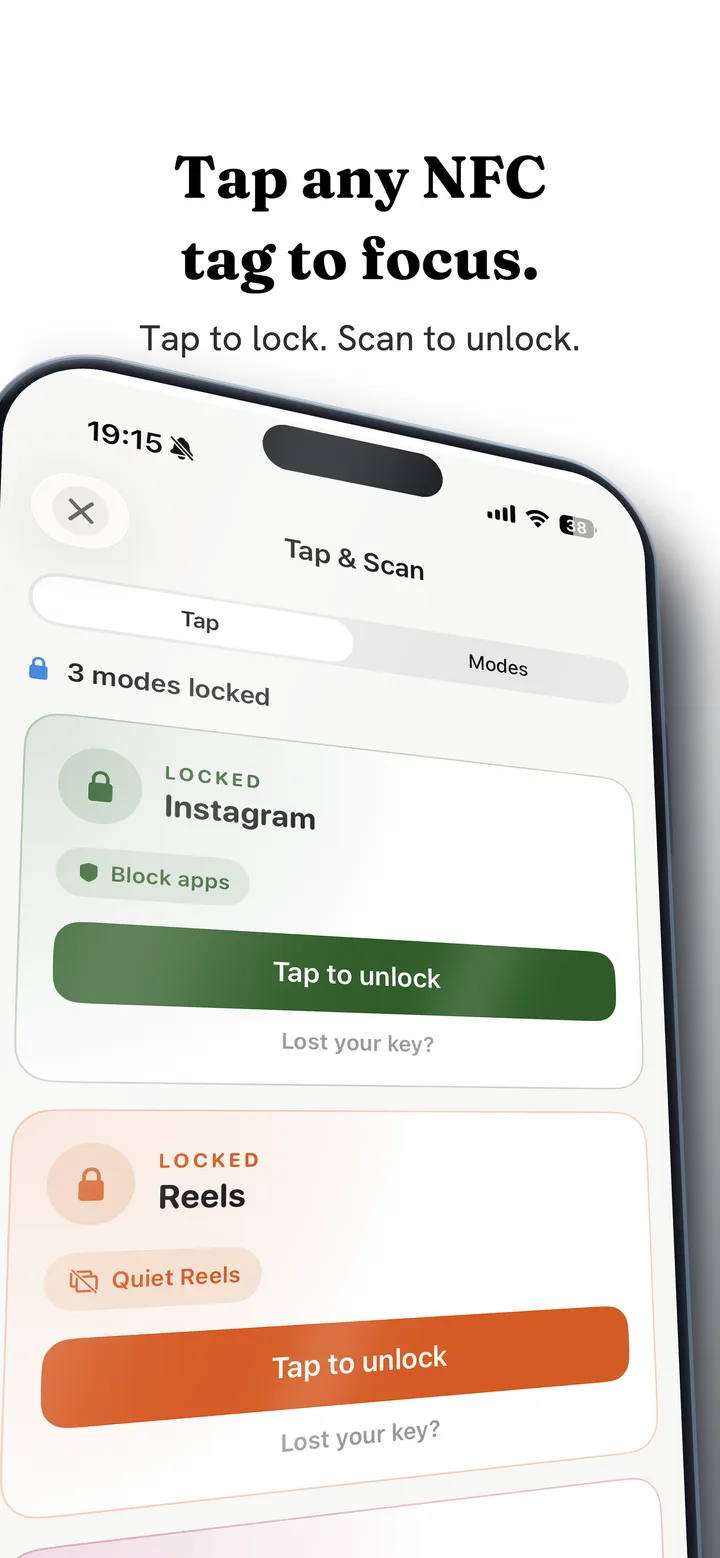
Tap any tag you already own to switch a profile on or off. A tag can start a session, end one, or run a timed mode that expires by itself so you do not have to walk back to it. Different tags can carry different rules, so the desk tag and the bedside tag do different things.
The alarm is the part people keep longest. It can be set so that the only way to silence it is to scan a tag you deliberately placed in another room, and the wake tone keeps sounding if you lock the phone or press Home, because silencing on backgrounding would defeat the entire point. Getting out of bed to scan a sticker in the hallway is a small, undignified, extremely effective intervention.
Alongside the tags, the app's main mechanic is friction rather than blocking. Each scroll becomes a drag through on screen fluid, and past a threshold you set, a bubble has to form under your thumb and rise off the screen before the feed moves. A fast flick bursts the bubble and advances nothing.
That is a different promise from a wall, and friction versus blocking explains which one suits which problem.
It is free on Google Play and on the App Store. NFC works on both, and the iOS version reads only a tag's identifier, nothing else.
The mechanics are in how scroll friction works. On Android, a tag can reach further, down to single feeds inside apps, which is covered in NFC phone blockers without the hardware. If your iPhone's Screen Time setup is the thing not holding, start with why iPhone Screen Time is not working.
Where Brick genuinely wins
Worth saying, because a comparison that finds no strengths in the competitor is not a comparison.
The object is nicer. A designed piece of hardware sitting on a shelf is a better daily reminder than a sticker on a cupboard door, and people who like objects will use it more.
It is one decision. Buy it, put it somewhere, done. Configuring an app with tags and profiles is more setup, and setup is where good intentions die.
Nothing to configure wrong. If you want a single, obvious ritual with no options, an appliance beats a settings screen.
If those matter more to you than the price, buy it. The rest of this page is for people whose answer is that the ritual is the point and the object is optional.
Brick alternatives, compared on what you pay
Because the tag is dumb, everything interesting happens in software. So compare apps on what they do when the tap lands.
| What you want at tap time | What to check |
|---|---|
| Apps blocked until you tap again | Whether the block survives a restart and an uninstall attempt |
| A timed session that ends itself | Whether a duration mode exists, so you do not have to walk back |
| Different rules for different tags | Whether one tag can mean work mode and another bedtime |
| To wake up properly | Whether an alarm can require a tag scan to dismiss |
| Nothing to buy | Whether the app works with generic tags rather than only its own |
That last row is the one that separates the category. Some apps only respond to their own hardware, which is a business model rather than a technical requirement.
- Fluid FrictionThis guideFreeEvery blocking tool included. Optional subscription is cosmetic only.Keeps the rest of the appFriction on every swipe
- ScreenZenFreePaid extras $4.99 to $19.99Keeps the rest of the appPause before opening
- one secFree for one appPro $3.99 to $99.99Keeps the rest of the appBreath before opening
- OpalCore needs a plan$2.99 to $79.99, account requiredWhole app onlyBounces you out to Opal
- AppBlockFree for 3 appsPremium $0.99 to $119.99Keeps the rest of the appBlocks feeds on a schedule
- BrickAbout $59For the NFC device the app needsWhole app onlyTap a device to unlock
Common questions
Do I need to buy Brick to use NFC blocking?
No. Brick's tag is a standard passive NFC chip, and any tag can trigger the same behaviour in an app that supports generic tags. A pack of blank stickers costs a fraction of the hardware and works identically.
What can I use as an NFC tag?
Blank NFC stickers are the usual choice. Old transit cards, hotel key cards and chipped loyalty cards also work. Avoid using a contactless bank card, since a daily ritual should not involve handling your payment card repeatedly.
Does NFC blocking work on iPhone?
Yes, within Apple's limits. A tag scan can start or end a session inside an app, and it can be required to dismiss an alarm. It cannot rewrite system settings, because blocking on iOS always runs through Apple's Screen Time frameworks.
Can I use a tag to make myself get out of bed?
That is the most effective use of the idea. Place a tag in another room and set the alarm so that scanning it is the only way to silence the tone. The wake sound continues if you lock the phone, so going back to sleep requires standing up.
Is a tag harder to bypass than an app setting?
Yes, because bypassing it costs physical effort rather than a tap. That is the entire insight behind this category, and it holds whether the tag came in a designed case or off a roll of stickers.