Choosing a tool4 min read
An NFC Phone Blocker Without Buying the Hardware
The tap to block idea is good: a physical gesture is harder to talk yourself out of than a settings toggle. The hardware is the part you do not need. On Android, an NFC phone blocker can read any tag you already own, a transit card, a hotel key, a sticker from a pack of ten, and flip a blocking profile with the same tap.
On this page (6 sections)
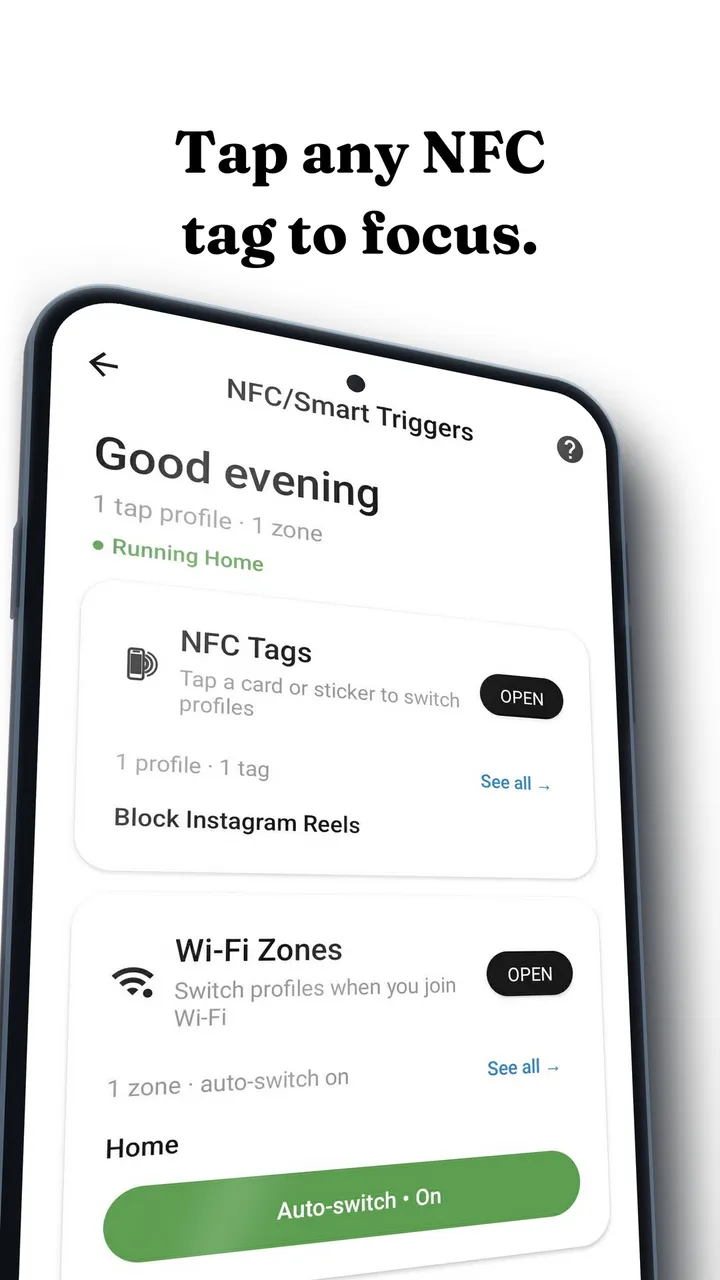
The tap to block idea is genuinely good, and worth understanding before you buy anything. Flipping a phone into focus mode by touching it to a physical object works better than a settings toggle for a simple reason: a physical action lives outside the argument you are having with yourself. You put the thing by the door, you tap it, the phone changes. There is no menu to negotiate with.
What you do not need is a proprietary cube. An NFC phone blocker is just an app that reads a tag ID and applies a profile, and Android will read any tag you already own.
How to set up an NFC phone blocker in four steps
Install Fluid Friction and enable NFC
Get it free on Google Play and make sure NFC is on in Android settings. Nothing here needs a subscription.
Open Tools, then NFC Profiles
Choose Add tag, then hold the tag to the back of your phone. The app records the tag's ID. It does not write to the tag, so your transit card keeps working.
Pick what the tap does
A profile can toggle, so the same tag turns focus on and off. It can run for a set duration, so a tap gives you 45 minutes and then releases on its own. Or it can switch to a scheduled profile.
Choose the intensity for that profile
This is where it gets more useful than a simple block. A tag can raise scroll friction rather than lock apps, so the phone gets harder to use rather than unusable. See how scroll friction works for what that feels like.
What you can use as a tag
Anything with an NFC chip your phone can read an ID from. You are not writing to these, only recognising them, so read only cards are fine.
- Transit cards. Most contactless travel cards read fine.
- Hotel key cards. The expired one in your drawer works.
- Student, gym or library cards. Anything contactless.
- Blank NFC stickers. Sold in packs of ten for a few pounds. Stick one inside a book cover, on your desk, on the bedroom door frame.
- An old bank card. Works, though most people prefer not to keep tapping the thing they pay with.
The placement matters more than the tag. Put it where the behaviour happens: the bedside table if the problem is night scrolling, the desk if it is work hours, the inside of the front door if you want a commute profile.
Tap to block versus tap to slow down
Most NFC products are binary: tapped means blocked, tapped again means open. That is a wall with a nicer interface, and it inherits the wall's failure mode, which is that at some point you resent it and stop using it. That pattern is covered in why app blockers don't work.
A tag that raises friction instead behaves differently. The phone still does everything. Feeds just stop being frictionless, so the ten second check does not become forty minutes. You never end up in the situation where the physical object is the thing standing between you and something you need, which is when people stop tapping it.
The automation you might prefer instead
NFC has one weakness: you have to remember to tap. If the behaviour you want is "strict at the library, relaxed at home", a tag is the wrong instrument, because you will forget at exactly the moments that matter.
Fluid Friction also supports Wi Fi based profiles, which pick the profile from the network name your phone sees. Your home network relaxes it, your office or campus network tightens it, and there is nothing to remember. It reads the network name rather than your position, so no location permission is involved.
Most people end up using both: automatic profiles for places, a tag for deliberate moments like sitting down to work or going to bed.
NFC hardware versus any tag, compared
The well known devices in this space, the cubes and the branded tags, are selling three things bundled together:
- A physical ritual. Real, valuable, and the reason the products work.
- An NFC tag. A passive chip costing pennies at volume.
- The software that reacts to it. The actual product.
The tag is not the value. The ritual is free once you have any object, and the software is software. The typical cost of these devices sits in the fifty to sixty range in dollars or euros, and some pair the device with a subscription on top.
If the ritual is what you want, you can have it today with a card already in your wallet. For the wider picture of what else costs nothing, see free app blockers for Android.
| Setup | Tap does | Fails when |
|---|---|---|
| Dedicated hardware, hard block | Locks selected apps | You need one of those apps and resent the cube |
| Any tag, hard block | Locks selected apps | Same, but you did not pay for it |
| Any tag, friction profile | Makes feeds resist scrolling | You genuinely decide to push through |
| Any tag, timed profile | Sets focus for a fixed period | You forget to tap it in the first place |
Common questions
Do I need a special NFC tag to block apps on Android?
No. Any NFC tag your phone can read an ID from works, including transit cards, expired hotel keys and cheap blank stickers. Dedicated hardware bundles a tag with software, but the tag itself is not the valuable part.
Does tapping the tag write anything to my transit card?
No. The app records the tag's identifier so it can recognise it again. Nothing is written, so a card you use for something else keeps working exactly as before.
Is NFC blocking free in Fluid Friction?
Yes. NFC profiles, along with scroll friction, feature blocking, scheduling and limits, are part of the free core. The optional Fluid Pro subscription unlocks cosmetic extras such as extra themes and dark mode.
What if I forget to tap the tag?
That is the main weakness of tap to block. Wi Fi based profiles cover it by switching automatically based on the network name your phone sees, with no location permission and nothing to remember.
Does NFC blocking work on iPhone?
Yes, within Apple's limits. A tag scan can start or end a session inside an app that is listening, and it can be required to dismiss an alarm. It cannot rewrite system settings, because blocking on iOS always runs through Apple's Screen Time frameworks. Fluid Friction is on the App Store too.
Should I buy dedicated NFC hardware anyway?
Buy it for the object, not the capability. Some people respond to a purpose built thing more than to a sticker, and that is a real effect. But the capability is free, and testing the ritual with a hotel key card costs nothing. The direct comparison is in Brick alternative without hardware.